General
How to Lock Team Tokens on Solana with Streamflow
A SolRugDetector study published on arXiv in early 2026 identified more than 76,000 fraudulent tokens among newly issued Solana tokens in the first half of 2025 alone.
In an environment where supply credibility is questioned by default, Streamflow gives teams a way to prove their tokens cannot move, with over $1.4 billion in total value locked and 40,000+ projects already relying on its on-chain infrastructure.
Locking team tokens is the single clearest signal a founder can send that they are building for the long term.
Team and founder allocations are the first place sophisticated allocators look. An unlocked team wallet sitting on 15 to 20 percent of supply is a dump waiting to happen, and the market prices that risk in immediately. A publicly verifiable lock removes the doubt by replacing a promise with an enforceable smart contract.
This guide is a complete, step-by-step walkthrough of how to lock team tokens on Solana with Streamflow, covering every decision from sizing the allocation to verifying the live contract on-chain.
Key Takeaways
Streamflow lets you lock team tokens on Solana with audited, immutable on-chain smart contracts.
Locked tokens cannot be transferred, traded, or accessed until unlock conditions are met.
Setup is no-code, takes about 37 seconds, and supports any SPL token.
Every lock produces a public proof link verifiable on Solscan, Solana Explorer, or RugCheck.
Over 40,000 projects use Streamflow for token locks, vesting, and distribution.
What Locking Team Tokens on Solana Actually Does
Token locks restrict tokens from being transferred, sold, or accessed until predefined conditions, such as a date or price level, are met. Applied to founder and core-team supply, a lock converts a stated commitment into a contract the market can verify independently.
The mechanism enforces the promise rather than relying on trust.
It helps to be precise about what a lock is not. A lock is a unilateral commitment that earns nothing and holds tokens fully until unlock, unlike staking, where tokens stay accessible through unstaking. It also differs from a liquidity lock, which secures LP tokens in a pool, though credible launches often run both a team lock and an LP lock together.
With that framing set, the rest of this guide is the actual process, step by step.
How to Lock Team Tokens on Streamflow, Step by Step
The entire flow is no-code and runs through the Streamflow app. The steps below follow the order you will hit them in practice, with the decisions that matter at each stage.
Step 1: Decide What to Lock and on What Terms
Before touching the app, settle the parameters. Founders typically lock the full team and core-contributor allocation, commonly 15 to 20 percent of supply, since a partially locked team wallet undercuts the entire signal. Lock everything the market would treat as insider supply.
Next, decide the unlock structure. The standard founder commitment is a 12-month cliff, after which tokens either unlock in full or begin a staged release.
Use this short checklist:
Allocation size: the exact number of tokens going under lock.
Lock duration: the cliff or end date, usually 12 months or longer for teams.
Unlock style: a single release on a date, or a gradual schedule afterward.
Recipients: one team wallet, or several contributor wallets.
If you need tokens to release gradually rather than all at once, plan to pair the lock with automated token vesting, which handles the staged distribution after the cliff. Locking proves the cliff; vesting handles what comes next.
Step 2: Connect a Solana Wallet
Open the Streamflow app and connect a Solana wallet. Phantom, Solflare, and Backpack are all supported, along with other standard Solana wallets.
Use the wallet that actually holds the team allocation, since that wallet funds and owns the lock contract. Confirm you are on Solana mainnet and that the wallet holds enough SOL to cover the small transaction fee.
This wallet becomes the depositing address that can withdraw once the unlock condition is met, and nobody else can.
Step 3: Select the Token and Lock Amount
Choose the SPL token you are locking and enter the amount. Streamflow works with any SPL token, so the same flow covers a freshly minted project token or an existing one.
Double-check the amount against your tokenomics plan before continuing. A lock is immutable once deployed, so the figure you enter is the figure that stays locked until the condition is met.
For team locks, this should match the allocation you committed to publicly, down to the token.
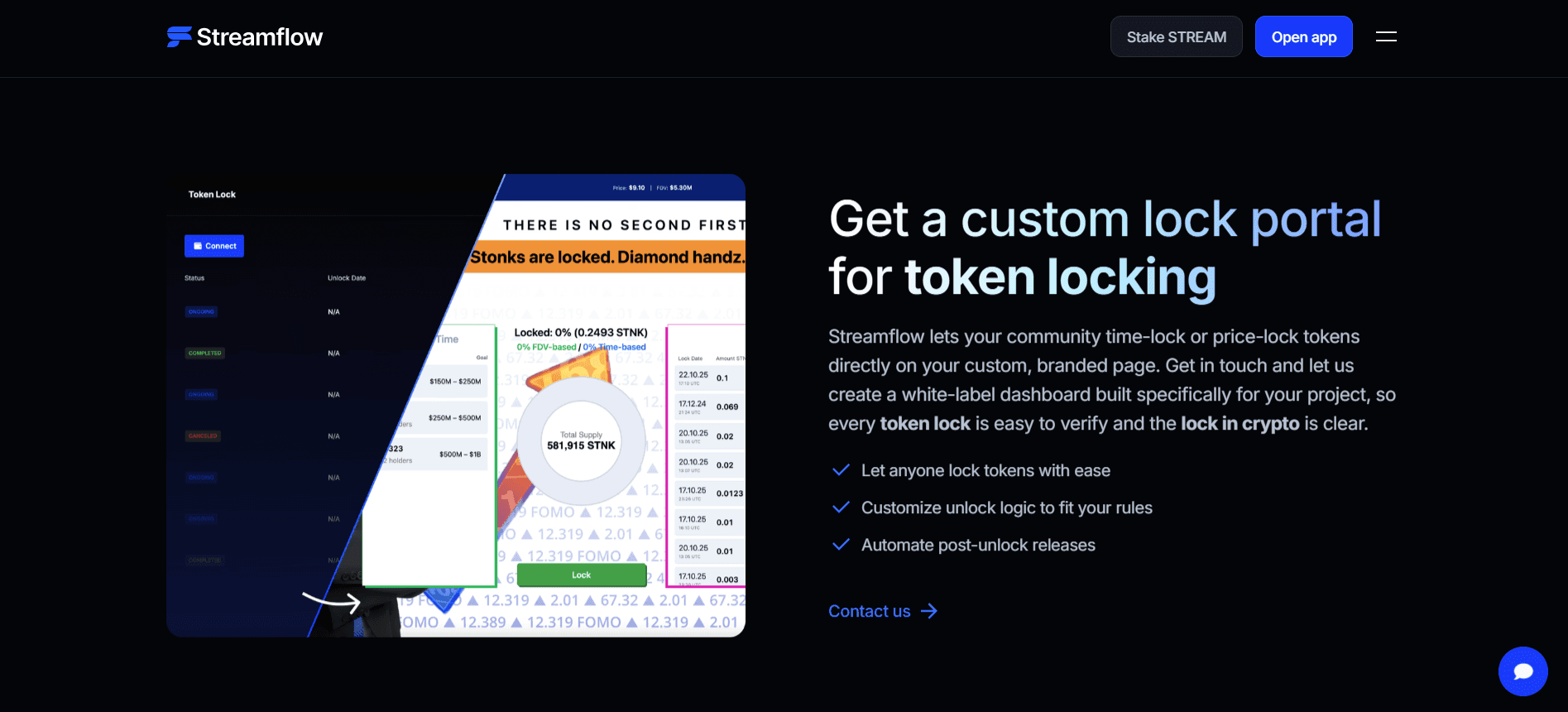
Step 4: Set the Unlock Condition
This is the core configuration decision. Streamflow supports more than a single fixed date, and the right choice depends on what you are signaling:
Lock type | How it works | Best for |
|---|---|---|
Time-based | Unlocks on a set date or after a fixed period | Standard team and founder cliffs |
Price-based | Unlocks only when the token hits a target price | Tying team access to performance |
Lock + vesting | Lock holds the cliff, vesting releases after | Staged, long-term team distribution |
For a typical founding team, a 12-month time-based lock is the cleanest starting point and the easiest for the community to read. Price-based unlocks suit teams that want to explicitly align their own access with hitting a market milestone.
Step 5: Fund the Lock Contract
Once the condition is set, fund the contract with the team tokens. This transfers the allocation into an on-chain vault controlled entirely by the smart contract, not by any wallet or by Streamflow.
Because the contract holds the tokens directly, there is no custodian and no admin key that can pull them early. After funding, the tokens are cryptographically inaccessible until the unlock condition is satisfied.
This is the moment the commitment becomes real and enforceable.
Step 6: Confirm, Deploy, and Get the Proof Link
Review every parameter, then confirm the transaction in your wallet. The lock deploys on-chain in seconds thanks to Solana's sub-second finality, and the whole no-code setup takes roughly 37 seconds end to end.
Streamflow then generates a public proof link for the lock. Save this link, because it is the artifact you hand to investors, list in your docs, and post for the community. It is the difference between saying the team is locked and showing it.
Step 7: Verify On-Chain and Share It
Do not stop at the proof link. Open the contract on Solscan or Solana Explorer and confirm the locked amount and unlock date match your commitment.
Tools like RugCheck also surface lock status automatically, so a clean lock shows up in third-party scans without any action from you.
Every lock also feeds the real-time tokenomics dashboard, which aggregates allocation, cliff dates, and upcoming unlocks into a single view. Linking that dashboard in your investor materials gives every stakeholder the same source of truth.
Developers who want to embed this same locking logic into their own product can build it programmatically with the Streamflow app and SDK.
A Worked Example: Locking 18% of Supply
To see the seven steps in practice, take a founding team launching a token with a 1 billion total supply. They allocate 18 percent, or 180 million tokens, to four core contributors, and they want a 12-month cliff followed by a 24-month linear release.
In Step 1, they document the terms: 180 million tokens, four recipient wallets, a 12-month cliff, then 24 months of vesting.
In Step 2, they connect the Phantom wallet holding the allocation and confirm it has SOL for fees.
In Step 3, they select the project's SPL token and enter the amounts, either 180 million in one contract or 45 million per contributor wallet.
In Step 4, they choose a time-based lock set to the 12-month cliff date, with vesting configured to handle the release afterward.
In Step 5, they fund the contract, moving the full 180 million into the on-chain vault.
In Step 6, they confirm and receive the proof link in well under a minute.
In Step 7, they open the contract on Solscan, confirm 180 million is locked to the correct date, and drop the tokenomics dashboard link into their investor data room.
The result is a single URL that answers who holds what, and when it unlocks, without anyone having to trust the team's word.
Common Mistakes to Avoid
A few errors quietly weaken an otherwise solid lock. Watch for these:
Locking only part of the team supply, which leaves an obvious unlocked wallet for the market to flag.
Setting the wrong amount or date, which cannot be edited after deployment because the contract is immutable.
Never sharing the proof link, which wastes the trust signal you just created.
Confusing a lock with staking, and assuming staked tokens count as a commitment when they remain accessible.
Getting these right is mostly a matter of finalizing your tokenomics before Step 1 rather than mid-flow.
For deeper background on the mechanics, Streamflow's guide for token locking on Solana covers the concepts in full.
Case Study: How Bonk Locked Core Team Supply
Bonk, the Solana meme coin that distributed 55 percent of its supply to early Solana users, needed a credible way to handle its core team allocation. With a large community watching, an unmanaged team wallet would have undercut the project's entire transparency narrative.
Bonk used Streamflow to lock and vest 20 percent of total supply across 22 early contributors on a 3-year linear vesting schedule. The allocation was held and released on-chain, giving the community verifiable proof that core contributors were committed for years, not weeks.
The outcome was a stronger trust and transparency position at exactly the moment community confidence mattered most.
Security and Verification You Can Point To
A lock is only as credible as the contract behind it. Streamflow's smart contracts are audited by FYEO and OPCODES, and once a lock is deployed it is immutable, with no mechanism for the team or the platform to alter it or withdraw early.
Verification stays open to anyone. The proof link and on-chain contract can be checked on Solscan, Solana Explorer, or RugCheck without contacting the project, and Streamflow is listed in the official Solana token vesting documentation as a trusted core tool.
This combination of audited code, immutability, and public verification is what turns a lock from a claim into proof.
What It Costs to Lock Team Tokens
The cost of locking team tokens on Streamflow comes down to a small smart contract creation fee plus Solana's transaction cost, which is effectively negligible.
There is no percentage cut taken from the locked allocation itself.
This is where Solana's economics matter. Near-zero fees and high throughput make locking, and later vesting, dramatically cheaper than running equivalent contracts on Ethereum, especially across multiple contributor wallets.
The practical takeaway is that cost is rarely the deciding factor; the verification and trust are.
Conclusion
Locking team tokens is the first and clearest trust signal a Solana project can send, and Streamflow turns the full process into a no-code, audited, publicly verifiable operation that takes under a minute.
Follow the seven steps, lock the entire team allocation on terms the market can read, and share the proof link everywhere it matters.
With $1.4 billion in total value locked across 40,000+ projects, the infrastructure is already proven at the scale a serious launch needs.
Book a demo to see how Streamflow handles team token locks, founder vesting, and on-chain proof for your launch.
Read Next:
Streamflow vs Sablier: Which Token Streaming Platform Is Better for Crypto Teams?
Token Vesting Explained: How Vesting Schedules Work in Crypto (2026 Guide)
FAQs:
1. How do I lock team tokens on Solana with Streamflow?
To lock team tokens on Solana with Streamflow, connect a Solana wallet, select the SPL token and amount, set a date or price unlock condition, fund the contract, then confirm and share the proof link. The full no-code process takes about 37 seconds.
2. How long should a team lock its tokens?
A team should typically lock its tokens for at least 12 months, the standard founder cliff, and often longer with a staged release afterward. Longer, clearly verifiable locks send a stronger commitment signal to investors and the community.
3. Can I change a team token lock after it is deployed?
No. Once a Streamflow lock is deployed it is immutable, meaning the amount and unlock condition cannot be edited by the team or by Streamflow. This is exactly what makes the lock a credible commitment, so finalize every parameter before confirming.
4. How can investors verify that team tokens are locked?
Investors can verify a Streamflow lock through its public proof link and on-chain contract on Solscan, Solana Explorer, or RugCheck. The real-time tokenomics dashboard also shows the locked amount, cliff dates, and upcoming unlocks in one place.
5. Can I lock team tokens and LP tokens together on Streamflow?
Yes. Streamflow supports both SPL token locks for team allocations and LP token locks for liquidity, so a launch can secure insider supply and pool liquidity through the same platform. Running both is standard practice for credible Solana launches.