General
Introducing NFT Locks: Lock Any Solana NFT On-Chain, for Free
Streamflow is the most trusted token operations platform on Solana, and with the launch of NFT Locks, that same on-chain lock infrastructure now extends to non-fungible assets.
The individual offering has already given hundreds of thousands of creators the tools to lock, vest, and signal commitment with fungible tokens. NFT Locks bring that exact guarantee down to a single NFT.
The mechanics are identical to a time-based token lock: you pick an asset, set an unlock date, and the lock is enforced on-chain until that moment arrives. The only differences are that the asset is a Solana NFT instead of fungible tokens, and that creating an NFT Lock is completely free.
This article covers everything teams and collectors need to know about NFT Locks: what they are, how the flow works, how to configure permissions, what they are built for, and how to get started.
Key Takeaways
NFT Locks let any Solana NFT be locked on-chain with Streamflow, completely free.
The flow mirrors time-based token locks: set an unlock date, a recipient, and optional permissions.
NFT Locks run on the same audited lock infrastructure trusted across 40,000+ Streamflow projects.
What Are NFT Locks?
An NFT lock is a mechanism that restricts a specific Solana NFT from being transferred, sold, or accessed until a predefined unlock date is reached. When the lock ends, the NFT is released automatically to a designated recipient wallet. It is the non-fungible equivalent of a time-based token lock.
This matters because NFTs increasingly carry real weight. A team might hold a founder-issued membership NFT, a project might escrow a rare asset inside a deal, or a collector might commit a blue-chip piece to signal long-term alignment.
In each case, the commitment is only worth something if it is provable and enforceable.
Streamflow turns that commitment into an on-chain fact instead of a promise. With permissions disabled, neither the holder nor Streamflow can move a locked NFT before its unlock date. NFT Locks make holding a verifiable action rather than a claim.
How NFT Locks Work
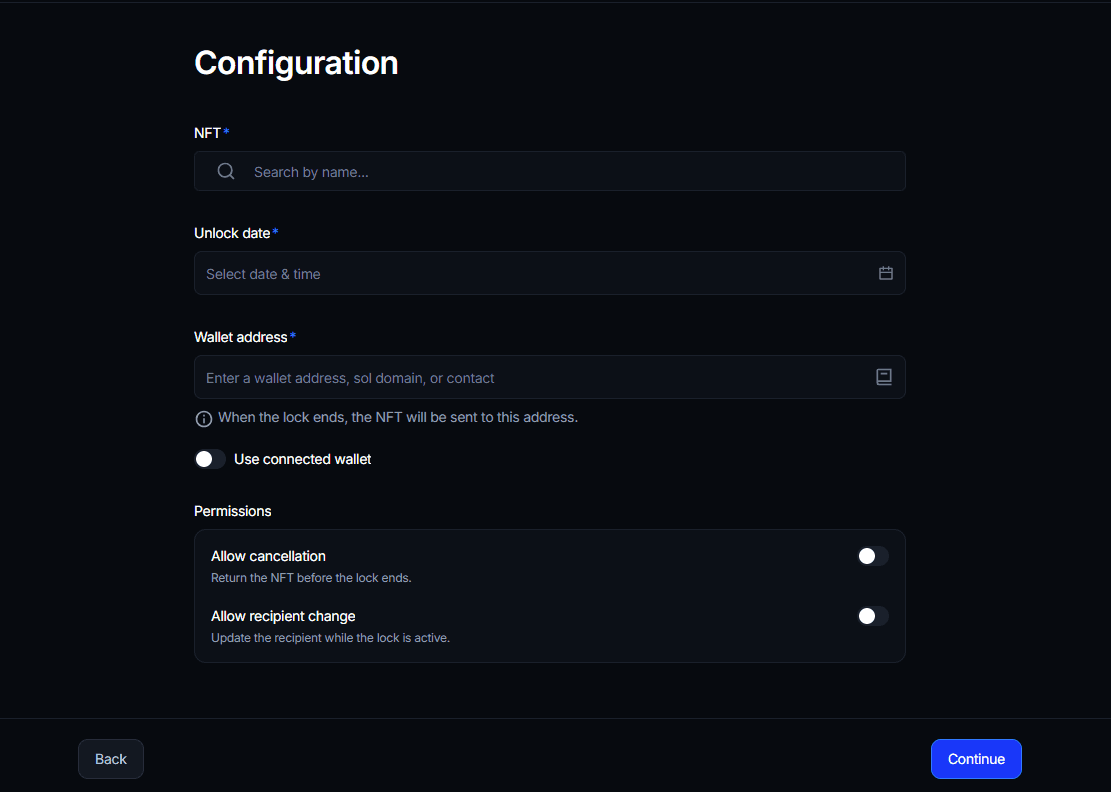
The flow is no-code and mirrors the token lock experience most Solana teams already use. From the Streamflow app, you create a new lock, choose NFT as the lock type, and configure the details.
Search and select the NFT you want to lock by name.
Set the unlock date and time when the NFT should release.
Enter the recipient wallet address, .sol domain, or a saved contact, or toggle "Use connected wallet" to return it to yourself.
Configure the optional cancellation and recipient-change permissions.
Review the summary, then confirm the transaction in your wallet.
Once confirmed, the NFT is locked on-chain and cannot be moved before the unlock time. When the lock ends, it is sent automatically to the recipient with no manual claim step, and every lock produces public proof verifiable on Solscan or Solana Explorer.
Configuration Options and Permissions
Every NFT Lock is defined by a small set of parameters. Together they determine both the schedule and the level of trust the lock signals.
1. NFT Selection
Any Solana NFT in your wallet is eligible. You search by name and select the exact asset to lock, and the lock behaves identically regardless of collection or floor price.
2. Unlock Date and Time
You set a precise unlock date and time, down to the minute, in your local timezone. The NFT cannot be accessed before this moment under any circumstances once the lock is live.
3. Recipient Wallet
You choose where the NFT goes when the lock ends: any wallet address, a .sol domain, or a saved contact. Toggling "Use connected wallet" sends it back to your own wallet automatically.
4. Allow Cancellation
Off by default. When enabled, the creator can return the NFT before the lock ends, which is useful for escrow or conditional deals. Left off, the lock is irreversible.
5. Allow Recipient Change
Off by default. When enabled, the destination wallet can be updated while the lock is active, useful when a beneficiary may change. Left off, the recipient is fixed at creation.
With both permissions off, the lock is a maximum-trust commitment: it cannot be reclaimed and cannot be redirected. The configuration you choose is itself a transparency signal, and it is visible on-chain.
NFT Locks vs Time-Based Token Locks
NFT Locks inherit the token lock model almost entirely. The table below shows what stays the same and what changes.
Feature | Time-Based Token Lock | NFT Lock |
|---|---|---|
Asset type | Fungible SPL tokens | Single Solana NFT |
Unlock condition | Fixed date and time | Fixed date and time |
Automatic release | ✓ | ✓ |
Recipient wallet | ✓ | ✓ |
Optional cancellation | ✓ | ✓ |
On-chain proof and verification | ✓ | ✓ |
Audited smart contracts | ✓ | ✓ |
Cost to create | Service fee applies | Free |
The takeaway is simple: if you already understand time-based token locks, you already understand NFT Locks, and this one is free.
What You Can Use NFT Locks For
Because the release is automatic and verifiable, NFT Locks fit any scenario where an NFT needs to be committed for a defined period.
1. Team and Collaborator Vesting
Lock membership or contributor NFTs to align long-term incentives, releasing them to a teammate's wallet on a future date.
2. Escrow and OTC Deals
Hold an NFT on-chain until a deal window closes, with cancellation enabled so the seller can reclaim it if terms fall through.
3. Roadmap and Treasury Commitments
Prove a treasury or reserve NFT will not move until a promised date, with both permissions off so the community can trust it fully.
4. Gaming and Metaverse Assets
For projects on Solana, schedule tamper-proof delivery of in-world assets and support secure NFT future distribution at a set moment.
5. Timed Transfers and Gifts
Schedule any NFT to reach a recipient automatically at a future date, without needing to be online when the moment arrives.
Free, Audited, and Verifiable
NFT Locks are free to create on Streamflow, with only Solana's near-zero network fees applying at the protocol level. The goal is to make on-chain NFT commitment the default, not a premium feature.
The feature runs on the same audited contracts that secure Streamflow's token locks and vesting, independently reviewed by FYEO and OPCODES. Contracts are immutable once deployed, produce public proof links, and are fully verifiable on Solscan and Solana Explorer.
With cancellation and recipient changes disabled, no party can move a locked NFT before unlock.
This is the same infrastructure Solana's most asset-heavy projects already rely on. The Heavenland case study is a clear example: the Solana metaverse placed 97% of its $HTO supply on a 5-year linear vesting schedule with cliffs through Streamflow, which let it provide liquidity without excessive inflation and build a more engaged community. NFT Locks bring that same verifiable guarantee down to a single non-fungible asset.
How to Get Started with NFT Locks
Unlike high-touch offerings, NFT Locks are fully self-serve and free. You can create one in seconds, in the same spirit as Streamflow's roughly 37-second token lock flow.
Step 1: Open the Streamflow App
Connect your wallet, go to Locks, and create a new lock. Choose NFT as the lock type.
Step 2: Select Your NFT
Search for the NFT you want to lock by name and select it from your wallet.
Step 3: Set the Unlock Date and Recipient
Choose the unlock date and time, then set the recipient wallet, or toggle "Use connected wallet" to return the NFT to yourself.
Step 4: Configure Permissions
Decide whether to allow cancellation and recipient changes. Leave both off for a maximum-trust, irreversible lock.
Step 5: Review and Confirm
Review the summary, confirm in your wallet, and the NFT is locked on-chain with a public proof link ready to share.
Conclusion
As Solana NFTs mature from collectibles into long-term utility, locking a specific asset on-chain becomes core infrastructure rather than a nice-to-have. NFT Locks give any holder a free, verifiable, and automatic way to commit an NFT until a set date.
They run on the same audited contracts that already secure $365M+ in total value locked across 40,000+ projects and 1.3M+ users, now extended from fungible tokens to a single NFT. It is the same guarantee Streamflow is known for, applied to the assets collectors and communities care about most.
Book a demo to see how Streamflow handles NFT locks, token locks, and vesting across your entire distribution stack.
FAQs:
1. How much do NFT Locks cost on Streamflow?
NFT Locks on Streamflow are free to create. The only cost is Solana's near-zero network transaction fee, which applies to any on-chain action. There is no Streamflow service fee for locking an NFT.
2. Can I get my NFT back before the lock ends?
You can get your NFT back before the lock ends only if you enabled the "Allow cancellation" permission at creation. If cancellation is left off, the NFT cannot be reclaimed or moved until the unlock date. This makes the permission setting itself a transparency signal.
3. What happens to my NFT when the lock ends?
When the lock ends, your NFT is sent automatically to the recipient wallet you specified during setup. No manual claim step is required, and the release is enforced on-chain. You can direct it back to your own wallet using the "Use connected wallet" option.
4. Are Streamflow's NFT Locks secure and audited?
Yes, Streamflow's NFT Locks run on the same audited smart contracts as its token locks, independently reviewed by FYEO and OPCODES. Contracts are immutable once deployed and fully verifiable on Solscan and Solana Explorer. With cancellation and recipient changes disabled, no party can move the NFT before unlock.
5. What can NFT Locks be used for?
NFT Locks can be used for team and collaborator vesting, escrow and OTC deals, roadmap and treasury commitments, gaming and metaverse asset delivery, and scheduled timed transfers. Any Solana NFT is eligible, and the automatic, verifiable release suits any scenario requiring proof of commitment.